A Routine Tuesday Migration
An engineer opens a pull request to add a NOT NULL column with a default value to the orders table, plus a new index to support a reporting feature the product team asked for. The migration is nine lines of SQL. It runs against the staging database in under a second. The CI pipeline, which runs every migration against a fresh copy of staging on every merge, goes green. Two reviewers approve the PR — one focused on the new index naming convention, one focused on the reporting query it supports. Nobody objects, because nothing about the change looks unusual: an ADD COLUMN, a CREATE INDEX, and a small data backfill to populate the new column for existing rows.
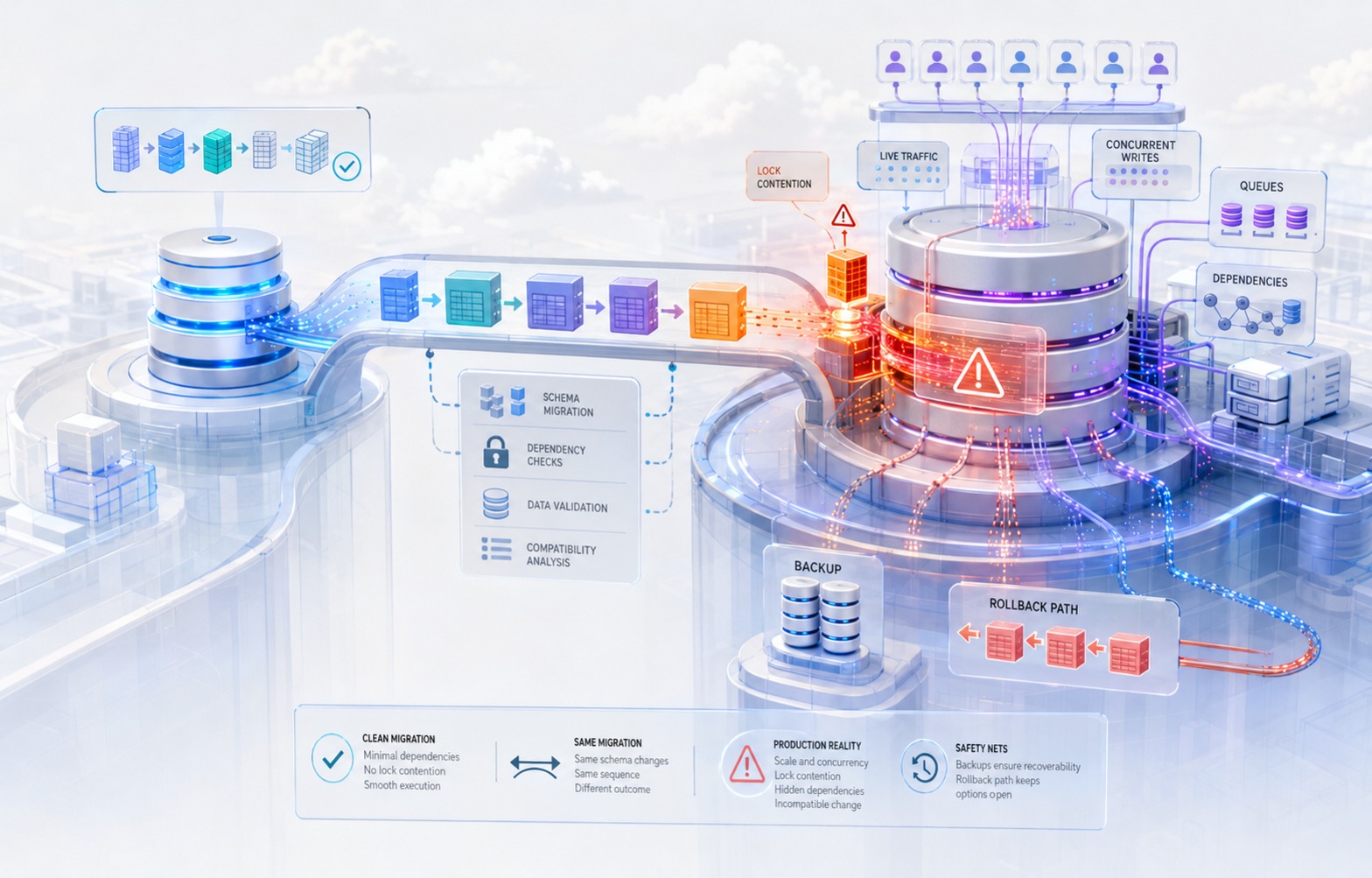
The deploy goes out in the company's normal release window, which happens to fall during a period of higher-than-usual write traffic because a partner integration is running a bulk sync that afternoon. The ALTER TABLE statement to add the index requests a lock. It queues behind an open transaction from the bulk sync — a transaction that has been sitting idle in a transaction block for four minutes because the partner's client library holds connections open between batches. Every query against orders that arrives after the migration's lock request also queues, because in most relational databases a lock request waits in line in the order it arrived, and nothing behind it can jump the queue. Within ninety seconds, the connection pool for the primary application is exhausted. The orders table — the table every checkout flow touches — stops accepting reads and writes. The on-call engineer receives paging alerts from four different services simultaneously, all of which trace back to timeouts on a single table they didn't know was involved in a migration that day.
The migration script was correct. It had been tested. It passed in staging on the first try, and on every try before that, because staging has a few hundred rows in orders, no concurrent load, and no long-idle transactions competing for the same lock. None of the conditions that turned a nine-line migration into a checkout outage existed anywhere the team had tested it.
This is not a story about a careless engineer or a rushed review. It's a description of what happens by default when database migration testing is treated as a subset of ordinary feature testing rather than as a distinct discipline with its own risks, its own test conditions, and its own review criteria. The gap between "the migration ran successfully in staging" and "the migration is safe to run against production" is where table locks that freeze writes, half-migrated states during rolling deploys, silent data loss from a mis-specified backfill, and multi-hour outages during what was supposed to be routine maintenance all come from.
This article is about closing that gap: understanding structurally why staging cannot catch these failures on its own, and building a testing and execution discipline that can.
The Core Problem: Staging Tests the SQL, Not the Risk
A migration script is, syntactically, just SQL. Running it against staging answers exactly one question: does this SQL execute without a syntax error, a constraint violation, or an application-level exception, given the data that happens to exist in staging right now? That is a legitimate thing to verify. It is also almost unrelated to the question that actually determines whether a migration is safe to run against production: what does this operation do to concurrent readers and writers while it executes, and what does the database look like in the seconds, minutes, or hours between "migration started" and "migration and all dependent application code are fully deployed"?
Four structural differences between a typical staging environment and production explain why a clean staging run provides almost no evidence about production safety.
Staging is smaller. A table with 200,000 rows in staging might be 400 million rows in production. Table size directly determines how long an operation that needs to scan or rewrite the table takes, and duration is often the single biggest driver of risk: a lock held for 40 milliseconds is invisible, and a lock held for 40 minutes is an incident, even though it's the identical ALTER TABLE statement.
Staging is quiet. Most staging environments have no continuous write traffic, or traffic generated by a handful of QA engineers and scheduled synthetic tests. Production has a live mix of application transactions, background jobs, replication processes, analytics queries, and, not infrequently, at least one long-running transaction that a developer forgot to close or that a reporting query is deliberately holding open. Lock-based migration failures are fundamentally about contention, and contention requires concurrency. A migration that acquires a brief but exclusive lock is safe if nothing else wants that table at the same moment, and unsafe if something does. Staging almost never has anything else wanting that table at the same moment.
Staging is structurally cleaner. Production tables accumulate legacy rows that violate assumptions nobody wrote down: NULLs in columns the team assumed were always populated after an early bug, string values in a column that's nominally numeric because an old import job didn't validate input, duplicate "unique" values from a constraint that was added after the fact and never fully enforced, foreign keys pointing at rows that were later soft-deleted. A migration or backfill written against the current schema definition, and tested against a staging database seeded from that same clean definition, will not surface what happens when it meets five years of accumulated exceptions.
Staging is deployed differently. In most organizations, staging deploys are far closer to atomic than production deploys: one environment, often one instance, updated in one action. Production, especially at any meaningful scale, deploys as a rolling update — old application instances are draining while new ones are starting, for anywhere from thirty seconds to several minutes. During that window, both the old code (which expects the old schema) and the new code (which expects the new schema) are executing simultaneously against the same database. Staging's deploy model rarely reproduces this window at all, so a migration that requires code and schema to change in lockstep can look completely fine in staging and still break in production the moment two versions of the application overlap.
None of these four gaps is a testing oversight in the sense of "the team forgot to write a test." They are gaps built into what staging environments are for. Staging exists to validate application behavior against a representative but manageable dataset, under controlled conditions, without production traffic. That is precisely the set of conditions a dangerous migration needs to hide inside.
Why "It Ran Successfully in Staging" Is a Weak Signal
There's a second, more subtle reason a passing staging run provides weak evidence: a migration is normally run exactly once, in one direction, under one set of conditions, and that single successful execution gets treated as proof the change is sound. Compare this to how the same team would treat a piece of application logic. Nobody ships a payment calculation function after confirming it produces the right answer for a single input. They write test cases for boundary conditions, unusual inputs, and failure paths, and they run those cases repeatedly. A migration script, in most organizations, gets none of that. It gets one run, against one dataset, in the forward direction only, and if that run doesn't throw an error, it's considered validated.
This matters because migrations have failure modes that a single successful forward run cannot reveal by construction:
- Rollback was never executed. A migration might have a
downmethod or an explicit rollback script that has literally never run, on any database, ever. Whether it actually restores the prior state — including any data transformed by a backfill — is unverified until the moment the team needs it under incident pressure, which is the worst possible time to discover it's broken. - The lock behavior is a function of table state, not just SQL syntax. The same
ALTER TABLEstatement can take an ACCESS EXCLUSIVE lock for a few milliseconds on an empty table and hold the equivalent lock for tens of minutes on a large one, or behave completely differently depending on whether a concurrent long transaction is already holding a conflicting lock when it starts. A staging run confirms syntax. It says almost nothing about duration or contention. - A backfill's completion status hides its correctness. A background job that reports "completed successfully" has told you the job finished running, not that every row was updated as intended. A backfill that silently skips rows matching an edge case — a NULL where the code expected a value, a type mismatch it caught and swallowed, a row that failed a validation and was logged rather than raised — will report success while leaving data quietly wrong.
- The window between deploys is untested by definition, because a single-environment staging deploy doesn't have a rolling window to test in the first place.
The practical consequence is that "the migration passed in staging" is true and simultaneously almost uninformative about the risks that actually cause production incidents. Teams that treat it as sufficient evidence aren't making a reasoning error exactly — they're relying on a signal that was never designed to answer the question they're asking of it.
The Four Failure Modes That Staging Doesn't Reproduce
It's useful to name these failure modes precisely, because each one calls for a different testing technique later in this playbook.
1. Long Table Locks That Freeze Writes
Certain DDL operations require an exclusive lock on the table for the duration of the operation. In PostgreSQL, the official documentation defines ACCESS EXCLUSIVE as a lock mode that "conflicts with locks of all modes" and states plainly that it "guarantees that the holder is the only transaction accessing the table in any way." Many forms of ALTER TABLE acquire a lock at this level, and — critically — "only an ACCESS EXCLUSIVE lock blocks a SELECT (without FOR UPDATE/SHARE) statement," meaning the operations that acquire it can block ordinary reads, not just writes. The same documentation confirms that a transaction seeking a lock "will wait indefinitely for conflicting locks to be released" absent a deadlock, and — this is the detail most teams learn the hard way — a pending exclusive lock request also blocks new lock requests behind it, even lock modes that would otherwise be compatible with each other. This is how one blocked ALTER TABLE cascades into a full table outage: it doesn't just wait for the thing ahead of it, it also becomes the thing every subsequent query has to wait behind.
MySQL's InnoDB storage engine offers more nuance through its online DDL algorithms. According to MySQL's own reference manual, operations under ALGORITHM=INSTANT (adding a column, dropping a column, renaming a column, changing a default) are metadata-only and permit full concurrent DML. Operations under ALGORITHM=INPLACE avoid a full table copy but, depending on the specific operation and the LOCK clause used, may still range from LOCK=NONE (full concurrent access) to LOCK=SHARED (concurrent reads, no writes) to LOCK=EXCLUSIVE (no concurrent access at all). Operations that fall back to ALGORITHM=COPY — changing a column's data type, reordering columns, adding an auto-increment column — rebuild the table into a temporary copy and, per MySQL's documentation, "generally prohibit concurrent DML" for the duration. The practical implication is that the exact same category of change ("modify a column") can be near-instant or a full-table-copy operation depending on precisely what's being modified, and a team that hasn't checked which algorithm their specific change falls into is exposed to a locking behavior they haven't verified.
The staging gap here is duration. A lock held for 5 milliseconds against an empty table and a lock held for 25 minutes against a 300-million-row table are the same lock type, acquired by the same statement, with entirely different blast radii. Staging's small table size erases the difference.
2. Half-Migrated States During Rolling Deploys
Every rolling deploy has a window — sometimes measured in seconds, sometimes in several minutes depending on health-check timing and instance count — where old application code and new application code are both live and both querying the same database. If the migration changed the schema in a way the old code doesn't expect (a renamed column, a dropped column, a new NOT NULL constraint without a default), the old code starts throwing errors or, worse, silently writing bad data the moment the schema changes underneath it, and it keeps doing so until every old instance has drained.
This is a sequencing problem, not a syntax problem. The migration can be perfectly correct SQL and still be unsafe to deploy in the same release as the application code that depends on it, because the two don't roll out atomically. Staging, deployed as a single environment with no rolling window, has no mechanism to expose this at all.
3. Silent Data Loss From a Mis-Specified Backfill
A backfill script — code that reads existing rows and writes a new or transformed value into them — fails differently from a migration that throws an error. It fails by finishing. The job reports success, the row count processed matches expectations in the aggregate, and the actual per-row correctness is never checked, because nobody wrote a check for it. Common causes: the script's WHERE clause unintentionally excludes rows with a NULL in a filter column, a type cast silently truncates or defaults on values that don't parse as expected, a batched job's last partial batch is dropped by an off-by-one boundary condition, or a retry-on-error wrapper logs and skips instead of halting. None of these produce an error the team sees. They produce a completed job and a subtly wrong dataset that surfaces weeks later as a customer-reported bug that's very difficult to trace back to a migration everyone has forgotten about.
4. Multi-Hour Outages From What Was Supposed to Be Routine
The first three failure modes compound. A long lock queues application queries; the connection pool saturates; health checks on affected services start failing; orchestration systems, seeing failing health checks, may restart the very instances that are waiting on the lock, which doesn't release anything and can make the queue worse. What began as a single blocked ALTER TABLE becomes a cascading outage across every service that touches the affected table, and because the root cause is a queued lock rather than a crashed process, restarting things doesn't help — the fix is almost always to identify and terminate the blocking transaction, which requires someone to recognize what's actually happening under incident pressure, not always a given at 2 a.m.
A Pre-Migration Risk Assessment Framework
Before covering the playbook itself, it's worth having a structured way to decide how much scrutiny a given migration needs. Not every schema change deserves the full process described in the next section — a migration against an empty new table in a service with no production traffic yet doesn't carry the same risk as a migration against your primary orders table. The following framework is designed to be filled out at PR time, before the migration merges, and to produce a risk tier that determines how the rest of the playbook applies.
Migration Risk Assessment Checklist
| Factor | Low risk | Medium risk | High risk |
|---|---|---|---|
| Table size | Under ~100K rows, or a new table | 100K – 10M rows | Over 10M rows, or unknown/unmeasured |
| Write traffic on the table | Read-heavy, infrequent writes | Moderate steady writes | High-frequency writes, or writes concentrated in bursts (batch jobs, peak hours) |
| Lock type required | Metadata-only (e.g., MySQL ALGORITHM=INSTANT, Postgres ADD COLUMN with no default or a constant default post-v11) |
Brief exclusive lock with a known, bounded duration | Long-held exclusive lock, or lock duration proportional to table size and untested at scale |
| Application coupling | No application code changes required | Application code changes deploy in the same release, same schema compatible both ways | Old and new application code have incompatible expectations of the schema during the rollout window |
| Data transformation | No data movement, pure DDL | Backfill of a bounded, well-understood dataset | Backfill involving edge cases, legacy data, external system dependencies, or unclear data quality |
| Rollback plan | Rollback is the exact inverse DDL, trivially safe | Rollback is defined and unexecuted | No rollback path defined, or rollback would itself require a long lock or lose data |
| Blast radius if it goes wrong | Isolated feature, non-critical path | Affects a secondary but real user flow | Affects checkout, auth, billing, or another revenue-critical or trust-critical path |
| Timing flexibility | Can run any time, including immediately | Should avoid known peak windows | Must be scheduled deliberately and cannot run during business-critical periods |
Scoring guidance: A migration with any single "high risk" factor should go through the full playbook below, including a production-scale test, a concurrent-load test, and an explicit rollback rehearsal, regardless of how the other factors score. A migration that scores low or medium across every factor can move through an abbreviated version of the process — staging validation plus a peer review focused on the specific risk factors present — without requiring the full sequence.
This framework is deliberately not a scoring formula that outputs a single number. Migration risk doesn't average cleanly; a migration that is low-risk on six dimensions and catastrophic on one (say, it touches the payments table during a scheduled backfill) is a high-risk migration, full stop. The checklist exists to force an explicit conversation about each dimension rather than letting the aggregate feel of "this is a small change" substitute for actually checking table size and lock behavior.
The Implementation Playbook
This is the sequence a team applies, roughly in order, from the moment a schema change is proposed to the point it's confirmed stable in production. Not every step applies to every migration — the risk assessment above determines how much of this sequence a given change actually needs — but for anything that scores high-risk on even one dimension, skipping a step is how the incident in the opening scenario happens again.
Step 1: Classify the Migration Before Writing It
Before anyone writes SQL, classify the change along two axes: is it schema-only (DDL with no data movement), or does it involve a backfill (data movement, possibly alongside DDL)? And does it require application code to change in a way that's incompatible with the current schema, or is it purely additive?
Purely additive, backward-compatible changes — adding a nullable column, adding a new table, adding an index — are the least risky category and the ones most teams handle reasonably well already. The risk concentrates in changes that are not backward-compatible on their own: renaming a column, dropping a column, changing a column's type, adding a NOT NULL constraint to an existing column, or splitting one table into two. Any migration in this second category needs the expand-contract treatment described next, not a single-step deploy, regardless of table size.
This classification step is cheap and it's the single highest-leverage decision in the whole process, because it determines whether the migration can even be a single deploy in the first place. A team that skips this step and writes a rename-column migration as one atomic change has already created the half-migrated-state risk described earlier, no matter how carefully everything downstream is tested.
Step 2: Design for Expand-Contract, Not Big-Bang Change
The expand-contract pattern — sometimes called parallel change — is the standard technique for making a schema change backward-compatible across a rolling deploy. The pattern, as described by engineering teams who've written about it extensively (see Sources), breaks a non-additive change into a sequence of additive, individually safe steps:
- Expand: Add the new schema element alongside the old one. If renaming a column, add the new column rather than renaming the existing one. If changing a type, add a new column with the new type. The old schema element still exists and old code keeps working against it unmodified.
- Dual-write (and optionally backfill): Deploy application code that writes to both the old and new schema elements simultaneously. Backfill historical rows so the new element is populated for existing data, not just new writes.
- Migrate reads: Once the new element is fully and verifiably populated, deploy application code that reads from the new element instead of the old one. Old and new code can coexist during this deploy because both elements still exist and both are being kept in sync.
- Contract: Once all application code has been fully migrated to the new element and this has been confirmed in production for a reasonable period, remove the old schema element in a separate, later migration.
The GitLab engineering team's public database migration documentation formalizes this into concrete multi-release rules that are worth adapting even outside a Rails/GitLab context. Their guidance for dropping a column, for example, spreads the change across three separate releases: in the first release, application code is changed to stop referencing the column while the column itself still exists in the schema (so a rollback of the application code doesn't break); in the second release, a post-deployment migration actually drops the column, only after the code that ignored it has been running safely; in the third release, the temporary "ignore this column" scaffolding in the application is removed. Their reasoning is explicit: "dropping a column is a destructive operation that can't be rolled back easily," so the safety comes from separating the code change from the schema change in time, not from making either change more clever.
The same source documents a subtler case: changing a column's default value. Because frameworks like Rails often omit columns matching their cached default from generated INSERT statements — letting the database supply the default — changing the default at the database level while old application instances still hold the old default cached can cause those instances to write the wrong value without any error at all. Their fix is to force explicit column writes in application code first (removing reliance on the cached default), change the database default in a subsequent deploy, and only then remove the temporary workaround. This is a good illustration of a broader point: application-level caching and ORM behavior can turn an apparently pure schema change into an application-compatibility problem, and expand-contract has to account for the ORM layer, not just the raw SQL.
The discipline expand-contract enforces is that at every point in the sequence, the schema supports both the old and new application code simultaneously. That's what makes a rolling deploy safe: there's no instant where deploying the Nth application instance out of N depends on every single one of the other N-1 instances already being updated.
Teams under deadline pressure frequently skip this pattern, and it's worth being honest about why: it takes more calendar time (multiple deploys instead of one), more discipline (someone has to remember to do the contract step weeks later), and more code (temporary dual-write logic that gets deleted afterward). None of that is free, and for a low-risk migration per the framework above, it may genuinely not be worth the overhead. For a high-risk migration against a large, high-traffic, revenue-critical table, the overhead is the cost of not causing the outage in the opening scenario, and it is cheap by comparison.
Step 3: Test Against a Production-Shaped Copy, Not a Clean One
Once the migration is written, the first real test is against data that resembles production in the dimensions that matter: size, and the presence of the messy edge cases production has actually accumulated.
This does not require a full production data dump for every migration — for many organizations that's undesirable for privacy and compliance reasons independent of migration testing. What it requires is a test dataset that is production-shaped on the specific properties the migration touches:
- Row count in the same order of magnitude as the real table, for any migration whose lock duration or backfill runtime depends on table size. A migration against a 5,000-row synthetic copy of a 50-million-row table tells you almost nothing about how long the real operation will take.
- The known edge cases in the affected columns, deliberately included rather than assumed away: NULLs where the schema technically allows them even if the team "doesn't expect" them, duplicate values in columns that will get a new uniqueness constraint, out-of-range values, and any rows created by since-removed code paths that may have written data the current application would never produce.
- Realistic value distributions for anything the migration indexes or partitions on, since skewed distributions (one tenant with 40% of all rows, one status value that covers 90% of rows) change index build time and query planner behavior in ways a uniform synthetic distribution won't.
Sourcing this data is an extension of an organization's existing test data management practice — masked or synthetic production-scale copies, refreshed periodically, are the standard approach, and the same masking and compliance controls a team already applies to test data generally should apply here. The point specific to migration testing is that "production-scale" is not optional for any migration in the medium-or-higher risk tier; a staging environment sized for functional testing is, by design, the wrong size for this test.
Step 4: Load-Test the Migration Under Concurrent Writes
Size alone doesn't reproduce the lock-contention failure mode from the opening scenario. That requires concurrency: the migration needs to run while something else is actively reading and writing the same table, ideally including a deliberately long-running transaction, since that's the specific condition that turns a normally brief lock into a queued pileup.
A practical version of this test: run a write-load generator against the target table (existing load-testing tooling repurposed for this, or a simple script issuing a steady stream of realistic inserts/updates/reads) against the production-shaped copy from Step 3, and kick off the migration in the middle of that load. Separately, open one transaction that touches the same table and deliberately hold it open — uncommitted — for a period longer than the migration is expected to take, to simulate the "idle-in-transaction" scenario that caused the outage in the opening scenario. Observe:
- Does the migration's lock acquisition block, and for how long, given the concurrent activity?
- Does anything else querying the table start timing out or queuing behind the migration's lock request?
- What happens to connection pool utilization during the migration window?
- If the migration is a DDL operation with a documented online mode (Postgres's
CREATE INDEX CONCURRENTLY, MySQL'sALGORITHM=INPLACE, LOCK=NONE), does it actually behave as advertised under this load, or does a specific condition in your schema (a foreign key, a particular index type) force a fallback to a more restrictive lock mode?
This test is the direct answer to the core problem described earlier: staging is quiet, so the only way to know what a migration does under contention is to deliberately manufacture contention and watch. Tools built specifically for large-table schema changes — MySQL's gh-ost, Percona's pt-online-schema-change, and Postgres's pg_repack — exist precisely because native DDL locking is a real constraint at scale, and each works by copying data into a shadow table and using triggers or binlog-based replication to keep it in sync, avoiding a long-held lock on the original table at the cost of additional complexity and its own set of edge cases (see Sources). Whether a team adopts one of these tools or handles it with native online DDL support, this step is where they'd find out whether the tool or approach actually delivers the low-lock behavior it promises against their actual schema and their actual concurrent load, rather than trusting the vendor description of the tool.
This same test should also account for replication. Any large write operation — a backfill in particular, but also a big index build — has to physically reach every read replica before those replicas reflect the change, and a burst of write volume from a migration can widen replication lag measurably, even when the primary itself never blocks a single query. If any part of the application reads from replicas (a reporting dashboard, a read-heavy API path deliberately routed off the primary), a migration that looks completely clean on the primary's own metrics can still produce a stretch of stale or inconsistent reads downstream. Watching replica lag during the concurrent-load test, not just primary-side lock metrics, is part of what makes this step a genuine rehearsal of production conditions rather than a partial one.
An Anti-Pattern Worth Retiring: The Single Giant Transaction
A specific mistake shows up often enough in migration and backfill code to name directly: wrapping an entire large-scale change — DDL and backfill together — in one transaction, on the reasoning that a single transaction is either "all or nothing" and therefore safer. In practice this does the opposite of what teams intend. A single transaction spanning millions of row updates holds its locks for the transaction's full duration, holds back vacuum or cleanup processes that can't run past an old open transaction, and turns any mid-run failure into a full rollback of hours of work rather than a resumable point. Batching the backfill into many small, independently committed transactions — the practice described in Step 6 — isn't a compromise on safety; it's the safer design, precisely because it bounds how much work is at risk in any single failure and keeps each individual lock brief. The intuition that "one big transaction is more atomic and therefore safer" is understandable, but it optimizes for a failure mode (partial completion) that batching handles just as well, while ignoring the failure mode — long-held locks and blocked maintenance processes — that a single giant transaction actively causes.
Step 5: Test the Middle, Not Just the Ends
This step targets the half-migrated-state failure mode directly, and it's the step most commonly skipped, because it requires deliberately creating a state most teams try to avoid: old code and new code running against the schema at the same time.
Concretely: deploy the schema migration to a test environment, but hold back the application code deploy, or vice versa, and run the previous version of the application against the new schema (or the new version against the old schema) for a meaningful period — not just a smoke test, but long enough to exercise the paths that actually matter: creating records, updating them, running background jobs, running scheduled tasks. Confirm explicitly:
- Does the old application code throw errors against the new schema, or does it silently succeed while writing incomplete or incorrect data (the more dangerous outcome)?
- If the migration added a
NOT NULLconstraint, does old code that doesn't know about the new column fail its inserts outright, or does a default handle it gracefully? - If a column was renamed via the expand-contract pattern, is the dual-write step actually keeping both columns in sync under real write patterns, including edge-case paths like bulk imports, admin tools, and background jobs that might not go through the same code path as the primary API?
This is naturally where a canary or staged rollout strategy pays for itself beyond its normal purpose: deploying the new application version to a small percentage of instances first means the "old code and new code coexist" window is not just a theoretical few seconds during a rolling restart, it's an extended, observable period where you can watch the specific metrics that would reveal a schema-compatibility problem — error rates, write failures, data validation failures — before the deploy completes everywhere.
Step 6: Treat the Backfill as Its Own Program, Not a Side Effect
A backfill deserves separate scrutiny from the schema change it accompanies, because its correctness failure mode — silent, partial, or miscast data — doesn't show up as an error. The discipline here has three parts.
Design the backfill to be resumable and idempotent. It should be safe to run twice, and safe to stop and restart from wherever it left off, because production backfills against large tables often do get interrupted — by deploys, by database maintenance, by the team deciding to pause it during a peak period. A backfill that isn't idempotent turns a routine pause into a data-corruption risk.
Batch it, and rate-limit it deliberately. Updating 400 million rows in a single transaction is both a locking risk and a replication-lag risk (a large single transaction can cause a meaningful delay in how quickly changes reach read replicas, which affects anything reading from those replicas during the backfill). Batching into smaller transactions — a few thousand rows at a time, with a brief pause between batches — trades total wall-clock time for a dramatically smaller blast radius per batch, and it's the approach documented in GitLab's own guidance for handling exactly this kind of large-table data migration.
Verify correctness with row-level checks, not job completion. "The job finished" and "the job did what it was supposed to do" are different claims, and only the second one matters. Practical verification techniques:
- A count comparison: does the number of rows matching the expected post-backfill condition equal the number of rows that should match it, based on an independent query against the source data?
- A sampled diff: pull a random sample of rows (weighted to include known edge cases — NULLs, boundary values, the oldest and newest rows) and manually or programmatically verify the transformation was applied correctly on each one.
- An explicit accounting of skipped or errored rows: the backfill should log, by ID, every row it didn't successfully process and why, so "how many rows failed silently" is a number someone can look at rather than an unknown.
- A reconciliation query run some time after the backfill completes, checking for any rows that still match the "not yet migrated" condition — this catches both backfill bugs and any new rows written by code paths the expand-contract dual-write step missed.
Step 7: Prove the Rollback Path Before You Need It
A rollback plan that has never been executed is a hypothesis, not a plan. This step requires actually running the rollback — on the production-shaped test copy, after the forward migration and any backfill have completed — and verifying it restores a correct state, not just that it executes without error.
For pure DDL with no data transformation, this is usually straightforward: reverse the operation and confirm the schema matches its prior state. For anything involving a backfill, it's substantially harder and worth calling out explicitly, because the honest answer for many backfills is that there is no clean rollback. If a migration transforms data in place — converting a field's format, merging two columns into one, deleting rows that meet some condition — reversing it requires either having preserved the original values somewhere (a shadow column, an audit log, a snapshot) or accepting that rollback means restoring from a backup, which is a dramatically more disruptive operation than reversing a migration script.
This is a case where the honest output of Step 7 might be "there is no safe rollback for this backfill, so the mitigation is X" rather than a rollback script — and that's a legitimate outcome of the process, as long as it's a deliberate decision made and documented before the migration runs, not a discovery made during an incident. If the risk assessment in the framework above flagged "no rollback path" as a factor, this is where that gets resolved: either a genuine rollback is designed and tested, or the team explicitly accepts forward-only risk with a documented mitigation (a pre-migration snapshot, a defined manual recovery procedure) and factors that into the decision of when and how carefully to run the migration.
Step 8: Rehearse the Execution, Including the Failure
For any migration in the high-risk tier, a dry run of the actual execution procedure — not just the SQL, but the operational sequence around it — surfaces problems that testing the SQL in isolation won't. This means walking through, on the test environment: who runs the migration, what monitoring they're watching while it runs, what the abort criteria are, who has the access and the knowledge to terminate a blocking transaction if the migration gets stuck, and how the team communicates status internally while it's in progress.
This rehearsal is also where a team can deliberately inject the failure mode from the opening scenario and confirm the response works: start a long-idle transaction against the test table, kick off the migration, and confirm someone on the team can correctly identify that the migration is blocked, find the blocking transaction, and resolve it — ideally using the actual monitoring and tooling they'd have available during a real production incident, not a database console they only have access to in the test environment.
Step 9: Execute With an Abort Condition Defined in Advance
The execution itself should have explicit, pre-agreed thresholds for aborting, decided before the migration starts rather than negotiated in the moment. Useful thresholds to define in advance: a maximum acceptable lock wait time before someone intervenes, a maximum acceptable increase in query latency on the affected table, a maximum acceptable error rate on requests touching that table, and a hard time box for the operation overall.
Running the migration during a deliberately chosen low-traffic window reduces risk but doesn't eliminate the need for these thresholds — a migration that's fine at 3 a.m. traffic levels can still hit an unexpected long-running transaction from a scheduled job, and the team needs a pre-agreed answer for what happens next rather than an improvised one. For any migration where the table is central to a revenue-critical flow, having someone actively watching key metrics during the execution — not just relying on alerting to fire after the fact — is the difference between catching a stuck lock in 90 seconds and catching it in 15 minutes because an alert threshold hadn't been crossed yet.
Step 10: Close the Loop After the Migration Ships
The work isn't finished when the migration completes without error. Three things close the loop:
Confirm the backfill's row-level verification from Step 6 in production, not just in the test environment — the reconciliation query that checks for unmigrated rows should run against the real table, and any discrepancy investigated before considering the migration done.
Watch the affected table's performance characteristics for a period after the change, particularly for anything involving a new index or a changed column type, since query planner behavior can shift in ways that only show up under real production query patterns and real data distributions, not the test copy's approximation of them.
Schedule the contract step if this was an expand-contract migration. The old schema element (the column being phased out, the temporary dual-write logic) needs an owner and a date, or it becomes permanent technical debt that nobody circles back to — which is exactly how organizations end up with tables carrying three generations of half-deprecated columns nobody feels safe removing.
A Hypothetical Walkthrough: The Backfill That Looked Finished
The following scenario is hypothetical and illustrates a pattern this article has described in the abstract — it is not drawn from any specific company, client, or reported incident.
Initial situation. A mid-sized SaaS company is migrating its users table to add a normalized_email column, intended to store a lowercased, whitespace-trimmed version of each user's email address so that future lookups and uniqueness checks can be case-insensitive without a functional index. The migration adds the nullable column, and a separate backfill script populates it for all 2.3 million existing users by reading email, applying .strip().lower(), and writing the result to normalized_email. The engineer tests the backfill against a staging copy of 4,000 users, confirms every row gets populated correctly, and schedules the production run.
The hidden assumption. The backfill script assumes every value in the email column is a valid, non-null string that a Python .strip().lower() call can process without error. This is a reasonable assumption about the schema as currently used — the application layer validates email format on every signup and every profile update — but it is not a reasonable assumption about the historical data. The email column has existed since the company's earliest days, including a period before email validation was added, and a subsequent period when a bulk-import tool for enterprise customers wrote rows with NULL in the email field for placeholder accounts that were supposed to be completed by an admin later.
The technical and organizational cause. The backfill script's core loop looks, in simplified form, something like:
for user in batch:
    try:
        user.normalized_email = user.email.strip().lower()
        user.save()
    except Exception as e:
        logger.warning(f"Skipping user {user.id}: {e}")
        continue
The try/except was added, reasonably, to prevent one bad row from crashing a multi-hour job processing millions of records. But it converts every failure into a silent skip rather than a stop-and-investigate signal. For the roughly 1,800 users with a NULL email — a number nobody had checked before running the backfill, because nobody queried for it — the .strip() call raises an AttributeError, gets caught, gets logged as a warning at a log level nobody actively monitors, and the loop continues. The job completes. The completion message reports "2,298,200 of 2,300,000 users processed" without anyone noticing that number isn't 2,300,000, or without anyone treating a 0.08% shortfall as worth investigating, since it looks like ordinary noise rather than a systematic gap.
The consequence. Three weeks later, the product team ships the feature normalized_email was built to support: case-insensitive login lookups, which query by normalized_email and no longer fall back to the original email column at all. The 1,800 accounts with NULL normalized_email can no longer be found by the login lookup. Some of these are the enterprise placeholder accounts, which are inactive and nobody notices immediately. But a subset of the 1,800 are real, active user accounts whose email address happened to be NULL for an unrelated historical reason — a data quality issue from a migration years earlier that had gone unnoticed because nothing depended on email being non-null until now. Those users start reporting they can't log in. Support tickets come in slowly over a period of days rather than all at once, since it's not a full outage, and it takes the team a meaningful amount of time to notice the pattern and trace it back to a backfill from three weeks prior that nobody was actively thinking about anymore.
The decision that needs to be made. When the team finally traces the bug to the backfill, they face a decision that's harder than it looks in retrospect: is the fix "re-run the backfill for the 1,800 skipped rows with a defined fallback for NULL emails," or does the presence of NULL emails on active accounts indicate a deeper data-quality problem — accounts that shouldn't have been considered "complete" or "active" in the first place — that the backfill incident has simply surfaced? Fixing only the symptom (populate normalized_email for the skipped rows) resolves the login bug without answering why 1,800 active-looking accounts had a NULL email in a system that has required one at signup for years.
The better approach. The correctness failure here didn't originate in the .strip().lower() logic, which was fine. It originated in treating "the job completed" as equivalent to "the job succeeded," and in testing the backfill against a staging dataset too small and too clean to contain the specific edge case (NULL emails) that broke it in production. A row-level verification step — a simple SELECT COUNT(*) FROM users WHERE email IS NOT NULL AND normalized_email IS NULL, run after the backfill and compared against an expected value of zero or a known, accounted-for exception list — would have caught the 1,800-row gap immediately, before the dependent feature shipped, while it was still a data question rather than a customer-facing incident. This is precisely the discipline Step 6 of the playbook describes: verify with a query against the actual data, not with the job's own self-reported completion status.
Who Owns Migration Safety
In many organizations, migration safety has no single owner. The engineer who wrote the feature writes the migration as an implementation detail. The reviewer who approves the PR is reviewing the application logic the migration supports, and treats the SQL as a formality. Infrastructure or platform teams, if they exist, may not review individual migrations at all unless something has already gone wrong. The result is that a change with real production risk gets the review scrutiny appropriate to a low-risk change, because no one in the review chain has been assigned the specific responsibility of asking "what does this do under production load, and what's the rollback."
There isn't one universally correct ownership model, but a few patterns work in practice, and the right one depends heavily on organization size (addressed in more detail in the next section):
- A designated migration reviewer or database-focused reviewer, separate from the feature reviewer, required for anything the risk framework flags as medium or higher. This person's job is specifically to evaluate lock behavior, table size, and rollback plan — not to re-review the application logic.
- An automated gate that classifies risk mechanically — flagging migrations that touch tables over a size threshold, or that use operations known to require restrictive locks, and routing those specifically for the fuller review process, so risk classification doesn't depend on every engineer remembering to self-assess honestly under deadline pressure.
- A runbook and an on-call assignment for the execution itself, distinct from who wrote the code, so that "who is watching this migration while it runs and who has the authority to abort it" is answered before it starts rather than discovered during an incident.
What doesn't work is treating migration safety as everyone's responsibility in the abstract, which in practice means it's no one's responsibility in the specific case that matters. The team that has explicitly named who evaluates risk, who reviews high-risk migrations, and who owns execution monitoring is the team that catches the opening scenario's failure mode before it ships, rather than during an incident retro.
How Migration Review Differs From Ordinary Code Review
Ordinary code review asks: is this logic correct, is it maintainable, does it follow conventions, is it adequately tested. Those questions matter for a migration too, but they're insufficient, because a migration's most dangerous properties are operational, not logical. A migration reviewer needs to ask a different set of questions, several of which a typical application code reviewer has no reason to think about:
- What lock does this specific operation take, on this specific database engine and version, and for how long given the actual size of the affected table?
- Is this migration backward-compatible with the application code currently running in production, for the full duration of a rolling deploy?
- If this includes a backfill, how is its correctness verified beyond "the job didn't throw"?
- What is the rollback plan, and has it actually been executed against a realistic dataset?
- What is the plan if this gets stuck mid-execution in production — who's watching, what's the abort threshold, who has the access to intervene?
None of these are questions "does this pass CI" answers, and a migration that passes CI (because CI ran it against a small staging database) can fail every one of them. This is the practical argument for treating migration review as a distinct checklist layered on top of ordinary code review, not a replacement for it — the application logic still needs the normal review, and the operational risk needs this additional, more specialized pass.
There's also a difference in what a reviewer is allowed to approve provisionally. Ordinary code review can reasonably approve a change with a follow-up comment like "let's tighten this validation in a later PR," because the cost of that gap is bounded and reversible. Migration review generally cannot extend the same latitude to an unresolved rollback plan or an untested backfill on a large table, because the cost of discovering the gap is not a follow-up ticket — it's an incident. A useful discipline for reviewers specifically evaluating migration risk is to require an explicit answer, not a placeholder, to each of the five questions above before approving anything the risk framework has flagged as medium or higher, and to treat "we'll figure out rollback if we need it" as a rejection reason rather than an acceptable open item.
Startups, Scale-Ups, and Enterprises: Different Failure Budgets
The right amount of process here is not constant across company stages, and applying enterprise-grade migration discipline to a five-person startup with a few thousand database rows is its own kind of mistake — it slows down a team that doesn't yet have the risk profile to justify it.
Early-stage startups typically have small tables, low concurrent write volume, and — critically — a much higher tolerance for a short period of degraded service, because the business impact of a five-minute blip is limited when the customer base and the revenue-per-minute are both small. For this stage, the highest-leverage practice from this playbook is simply Step 1 (classify the migration) and a basic version of Step 7 (know your rollback story) — most other steps can be applied lightly or skipped for genuinely low-risk changes, and the risk assessment framework earlier in this article is designed to make that judgment explicit rather than assumed.
Scale-ups are exactly the stage where the gap described in this article tends to bite hardest, because table sizes and traffic have grown past what staging naturally resembles, but process hasn't caught up — the team is often still operating with the informal, single-review migration habits that worked fine when the company was smaller. This is the stage where investing in a production-shaped test copy (Step 3) and a designated migration review step (see "Who Owns Migration Safety") tends to have the best return relative to effort, because it's cheap to add and it directly targets the failure mode most likely to actually occur at this size.
Enterprises typically have the table sizes and traffic patterns that make every step in this playbook worth applying to any medium-or-higher-risk migration, but they also carry additional constraints this article hasn't focused on in depth: regulatory change-management requirements, multiple teams whose services depend on the same shared tables (raising the coordination cost of any schema change), and often stricter constraints on production data access that make Step 3's production-shaped test data harder to source and require more careful masking. At this stage, the organizational question in the previous two sections — who owns migration safety, and how review differs from ordinary code review — usually needs a formal answer (a named team, a documented process) rather than an informal convention, because informal conventions don't scale across dozens of teams touching shared infrastructure.
The Cost of a Stuck Migration at the Wrong Moment
Migration risk isn't evenly distributed across the calendar, even though this article has deliberately avoided prescribing specific schedules or timing rules, since the right timing depends entirely on a business's specific traffic patterns. The relevant point is structural: any organization has periods where write traffic is meaningfully higher than baseline — a seasonal sales peak, a major customer's onboarding push, a scheduled batch process, the days around a significant product launch — and the same migration that would be a non-event during a quiet period can be the trigger for a serious incident during one of these windows, for exactly the contention reasons described throughout this article.
The cost of a stuck migration during a business-critical period compounds in a way that's easy to underestimate in advance. It isn't just the direct cost of downtime — lost transactions, refunds, SLA credits where applicable — it's the cost of diagnosing an unfamiliar failure mode (a blocked lock queue looks, to an on-call engineer without database-specific context, like a generic performance degradation, and precious minutes go into ruling out other causes before the actual blocking transaction gets identified) during a period when the team can least afford the diagnostic time. It's also reputational: customers experiencing a checkout failure during a peak sales period form a different impression than customers experiencing the same failure on an ordinary Tuesday, even though the underlying incident is technically identical.
This is the practical argument for building the risk assessment and testing discipline described in this article into the routine, rather than reserving it for migrations that "feel" risky. The migration in the opening scenario didn't feel risky to the team that shipped it — it was nine lines of ordinary-looking SQL. The entire value of a structured risk framework is that it doesn't rely on a change feeling dangerous to get treated as such.
Frequently Asked Questions
Does adding a column always require a long table lock? Not necessarily, and this depends heavily on the database engine and version. In PostgreSQL, adding a column with no default, or with a constant default, is a fast, metadata-only operation as of PostgreSQL 11 — it does not require rewriting the existing table, because the database can compute the value lazily for existing rows rather than writing it to every row up front. Adding a column with a non-constant default (one derived from a function, for instance) can still trigger a full table rewrite. In MySQL's InnoDB engine, adding a column is eligible for ALGORITHM=INSTANT, meaning it's metadata-only, provided the operation isn't combined with other changes that aren't instant-eligible. The practical takeaway is to check the specific behavior for your database version rather than assuming "just adding a column" is always cheap — it usually is, but the exceptions are exactly the kind of detail that a quick check in official documentation resolves before it becomes an incident.
If we use a managed database service, does the provider handle migration safety for us? A managed service typically handles infrastructure concerns — replication, failover, patching, backups — but it does not evaluate whether a specific ALTER TABLE statement you run against your schema is safe given your table size and traffic pattern. The locking behavior described throughout this article is a property of the database engine itself (PostgreSQL, MySQL, or whichever engine the managed service runs), not something a managed hosting layer changes. Some managed providers do offer tooling that reduces certain migration risks — online schema-change utilities, for instance — but using them safely still requires the testing discipline this article describes.
Is it ever acceptable to run a migration without the full testing process described here? Yes — for genuinely low-risk migrations, per the framework earlier in this article: small or empty tables, additive-only changes, no application code coupling, low write traffic. The point of having an explicit risk assessment is precisely to avoid applying heavyweight process uniformly, which both wastes effort on safe changes and, worse, trains teams to treat the full process as optional friction rather than as the specific response to specific risk factors.
How long should a team keep the old schema element around after an expand-contract migration, before doing the contract step? There's no universal answer, but the decision should be based on evidence rather than a fixed calendar interval: enough time for the new element to be confirmed correct under real production traffic, including any batch or scheduled processes that run less frequently than daily (a monthly billing job, for instance, needs at least one full cycle to prove it works against the new schema). What matters more than the specific duration is that the contract step has an owner and a tracked follow-up, since the primary risk isn't leaving it too short — it's leaving it indefinitely because nobody was assigned to finish it.
What's the difference between testing a migration and load-testing an application feature? Application load testing typically validates that a feature performs acceptably under expected traffic. Migration load testing validates something narrower and more specific: whether the act of changing the schema, while that traffic is happening, degrades or blocks it. The two are related but distinct — a feature can be well load-tested in its steady state and still be vulnerable to a migration-induced lock that has nothing to do with the feature's own code path, which is exactly what happened in this article's opening scenario.
Do feature flags remove the need for expand-contract sequencing? No, though the two are frequently confused. A feature flag controls whether a piece of application logic executes; it does nothing to change what the database schema looks like or how many application instances, at any given moment, are running code that expects one schema shape versus another. A migration still needs to be backward-compatible across a rolling deploy even if the feature depending on it is flagged off, because the flag governs application behavior, not the schema-compatibility problem described in this article. Feature flags and expand-contract sequencing solve adjacent but different problems, and treating a flag as a substitute for backward-compatible schema design is a common source of the half-migrated-state failures this article describes.
Can automated tooling catch these risks before a human review ever happens? Partially, and it's worth using what exists rather than relying entirely on manual review. Tools like the strong_migrations gem for Ruby on Rails maintain a list of migration patterns known to be unsafe on specific database engines — adding a column with a volatile default, adding an index without the concurrent variant, changing a column's type in a way that forces a table rewrite — and block them at development time with an explanation and a safer alternative. Equivalent linting exists in other ecosystems, and even a lightweight internal script that flags migrations touching tables over a defined row-count threshold, or using operations known to require a restrictive lock, catches a meaningful share of risk automatically. None of this replaces the deeper testing described in this playbook for genuinely high-risk changes, but it raises the floor on migrations that would otherwise skip scrutiny entirely because nobody flagged them as worth a closer look.
Getting Migration Testing Right Going Forward
QAtronic works with engineering teams to build migration testing into their release process — designing production-shaped test environments, running concurrent-load tests against planned schema changes, and verifying rollback and backfill correctness before a migration reaches a production database. If your team is planning a schema change against a table large or critical enough that "it worked in staging" doesn't feel like sufficient confidence, that gap between staging confidence and production safety is exactly what this kind of testing is built to close.
The central distinction this article has tried to establish is that a migration passing in staging and a migration being safe for production are different claims, verified by different tests, and conflating them is not a mistake any individual engineer makes carelessly — it's the default outcome of treating migration testing as a subset of feature testing rather than as its own discipline with its own risks. Staging will keep being smaller, quieter, and cleaner than production, because that's what staging is for. The fix isn't to make staging more like production in every respect; it's to recognize which specific properties of production actually determine migration safety — scale, concurrency, and the in-between state of a rolling deploy — and test those properties deliberately, on their own terms, before the migration runs against data you can't afford to get wrong.
The question worth taking back to your own team isn't "did the last migration cause a problem." It's narrower and more useful: for the next migration on your calendar, do you actually know what lock it takes, for how long, against your real table size, under your real concurrent load — or do you know that it passed in staging?